Don't Be a Wrapper, Be a Container
How Hopsworks became a runtime for coding agents
We launched Claude Code from inside Hopsworks and realised the platform could become the runtime for coding agents. Here's what we learned about containers vs wrappers, CLI vs MCP, and why your data platform should be where agents live.

Last week we presented our new implementation to make engineering, operating and managing machine learning systems easier by using popular tools such as Claude Code, Codex or Gemini. We wanted to deep dive a bit further on what makes it so different and what this could mean in the AI and data infrastructure field.
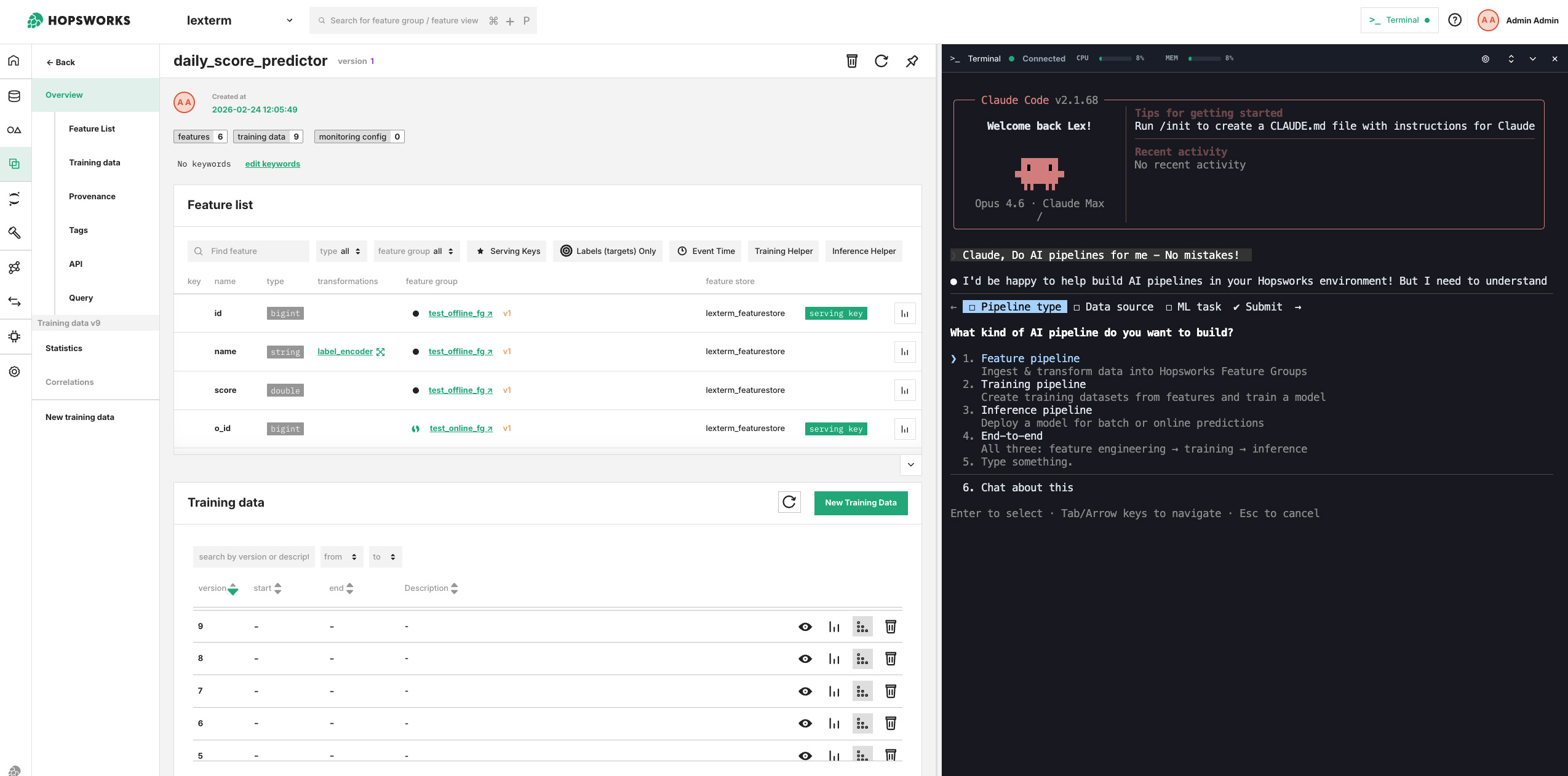
Figure 1. "Hey Claude, make me an AI pipeline - no mistakes!" A view of the Shell interface in Hopsworks using Claude for building ML pipelines.
The Oh Shit Moment for Data and ML Engineers?
Some time in the middle of last year, Jim Dowling, co-founder of Hopsworks, came enthusiastically to show me how he launched Claude Code from within a Jupyter terminal that we deploy with Hopsworks. It was the first moment we realised the implications: we could combulate / tabulate / fingulate / gesticulate with Claude Code within the platform while it could eventually have access to the whole platform (which is fully available via APIs), including the file system (we FUSE mount S3 via our tiered file system HopsFS), source code (we support GitHub/Lab/etc), authentication, the data sources, and so on.
Since then, we engineered relentlessly - and yes, we leveraged Claude Code as well - a new shell interface for Hopsworks that would allow users to interact and make your coding agent interact with the platform from the inside. At this point we had been working on an alternate coding agent called "Brewer" for specification-driven development of pipelines. But when we realized Claude now writes the specifications (plans) for you, we quickly pivoted Brewer to become a general purpose platform for any coding agent (not just Claude Code, but even sovereign AI solutions such as Mistral's Devstral).
Our reasoning was essentially that it is now the data platform's job to provide a secure, governed environment for building the AI and data pipelines that power AI and analytics products.
Why run a coding agent inside a data platform?
You don't strictly need to run a coding agent inside a data/AI platform. However, it can reduce large amounts of friction in ensuring access to data (sorry, context!) within the platform, and ensuring sensitive data does not leave the platform.
Claude Code and other coding agents work by navigating directories and reading files (e.g., source code and documentation) from the directory within which they are launched. In Hopsworks, all data/code is encapsulated in a project (think of a project as a Github repository with members and code, but a project can also store data and run compute). The project provides API access to all its data sources, files, compute capabilities, and platform capabilities. We make access to the API available via a CLI tool (we support MCP as well, but CLI tools work better with coding agents).
Another advantage of running an agent inside your Data/AI platform is that you can lock it down. You can launch a coding agent in Hopsworks that uses a LLM that is hosted in Hopsworks - all inside an air-gapped environment. Hopsworks provides vLLM/KServe support for LLM serving, and open-weight models like Devstral 2 and Qwen3-Coder are catching up fast with the frontier models.
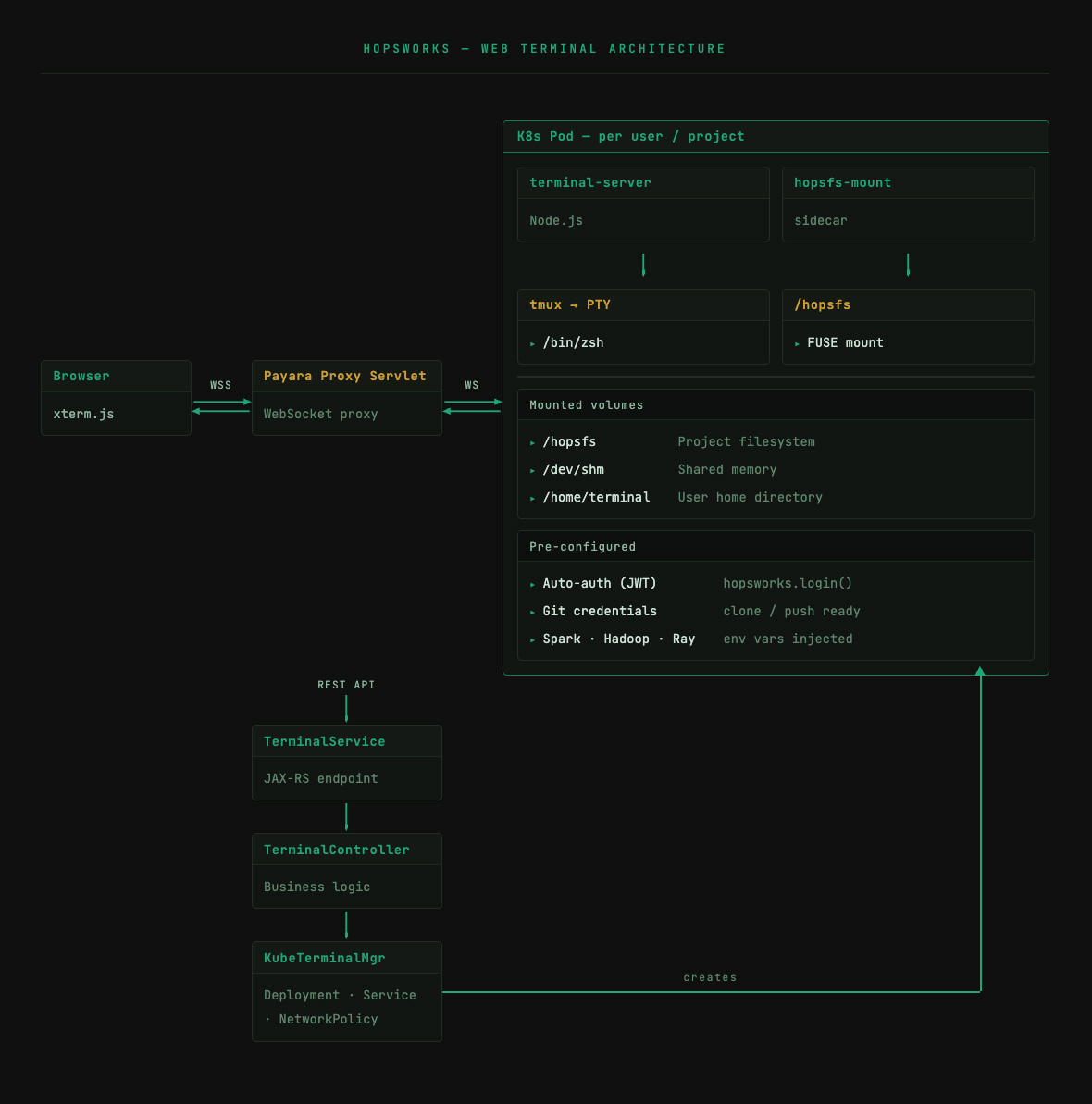
Figure 2. "Hey Claude, show me the architecture."
A Shell is not all you need
To operate effectively within a project, the agent needs more than a shell; it needs the ability to execute commands and take actions. The shell is just the first step; it is the sandbox from which the agent can exist and that sandbox can exist within the boundaries of the projects or, for admins, beyond; in that case, it could access the details of the underlying data infrastructure that the platform operates on; memory, compute capabilities etc. and could even review and send alerts - but more on that later.
As already mentioned, we also chose to move from MCP to CLI, seemingly because it just worked better and faster. The agent seemed to lose less time trying to understand the underlying commands and what they meant to achieve; less back and forth trying to force an output that didn't work. Coding LLMs have been trained on bash and CLI tools and can compose commands, the Unix way. With CLI tools, agents can use CLI switches and command line tools (e.g., head/tail) to retrieve just the context they need for their task, while MCP can overload the context window if you need to load complete tool descriptions for your platform. The shovels for coding agents now appear to be the container and the CLI tools. You can even ask your coding agent to fix your CLI tool's code. A simple "debug the CLI by trying this action" became a way to test the CLI during its development but also find and fix obscure or not yet discovered issues in the backend.
Now - this does not suffice either; as the tooling and the container do not provide context efficiently; Claude Code has not been trained on / or does not inherently recognise, all the aspects of a platform like Hopsworks; with its quirks and edges that come from a near decade-long of implementation and all the decisions that got carried along the way. This will be one of the final steps to make this "instrumentalisation" of the platform and its APIs by LLMs; align the implicit expectations of the LLM with the naming conventions, API patterns and path structures of the platform to reduce friction. In other words, the more specialised, non-conventional, closed and domain specific your platform is; the less it can be operated by LLMs, but, the more open and standards based your platform is, the more likely LLMs have encountered something similar in training data, and the less friction you get at coding time.
Beyond AI Systems?
For us - it also opens the possibilities to use the Hopsworks platform for use cases that are beyond the original MLOps scope of the platform. If Claude Code can now create datasets, review model deployments and launch jobs; it can also generate queries and dashboards from within the platform; suddenly users can do analytics and derive information from different sources right there in their shell interface. With new support coming for Trino and Superset in Hopsworks 4.8, it is evident that those agents will be able to generate the charts for the business units from the data for executives without any intermediaries (sorry, data analysts!).
Do we replace Tableau and the like? No. We replace the handover of the information to a different team; same agent, same flow, same context. Any user can now build the dashboard with the SAME coding agent within the same context. If you are a data scientist that needs to motivate the case for a specific project; you suddenly can do it, right there, in the data platform, without being a specialist. You have the ability to communicate your work better.
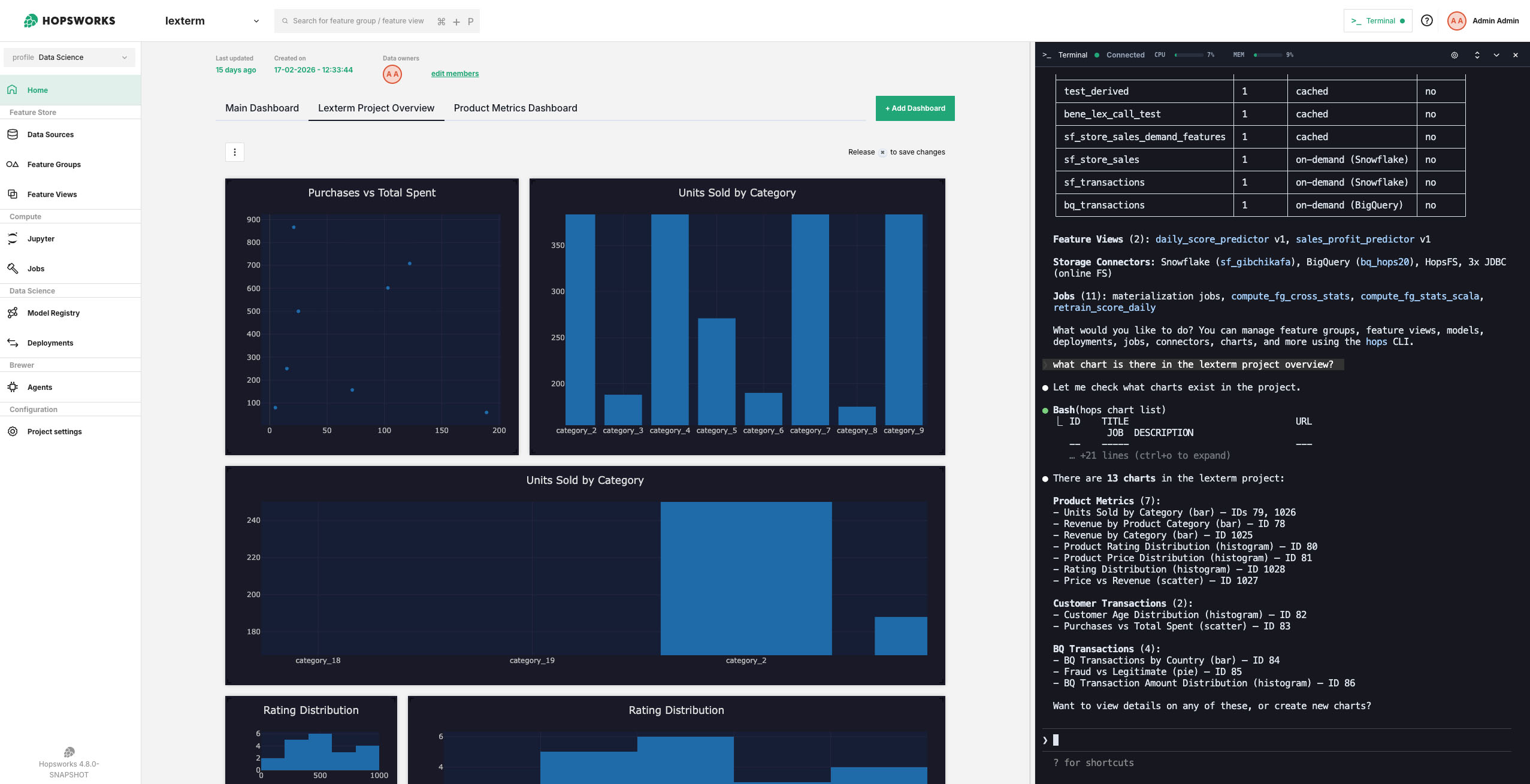
Figure 3. "Hey Claude, what charts are there in the project?"
Now what?
Improving convention, security and extending the capabilities of the agents to operate the systems is the direction of travel. Better yet, agent support: scheduled runs with scoped permissions for fire-and-forget agents, and tracing/debugging for interactive ones.
Lots of these new capabilities will be coming to Hopsworks in the coming months, and we will make it available to the community on our SaaS platform for startups and independent developers.
And if you are an enterprise, or a data center; we can deploy all this either on-premises or in the cloud; just reach out to us - a human will get back to you!